Ernie Image AI 1.0

Ernie Image Generator

Create clear, structured, and high-quality images from simple text prompts—fast and easy.

Turn short ideas into detailed visuals using a powerful AI image generator built for text-heavy design, structured layouts, and reliable prompt understanding.

New to ERNIE Image? Read our step-by-step guide on how to use ERNIE Image before generating.

0/5000

Expand with AI

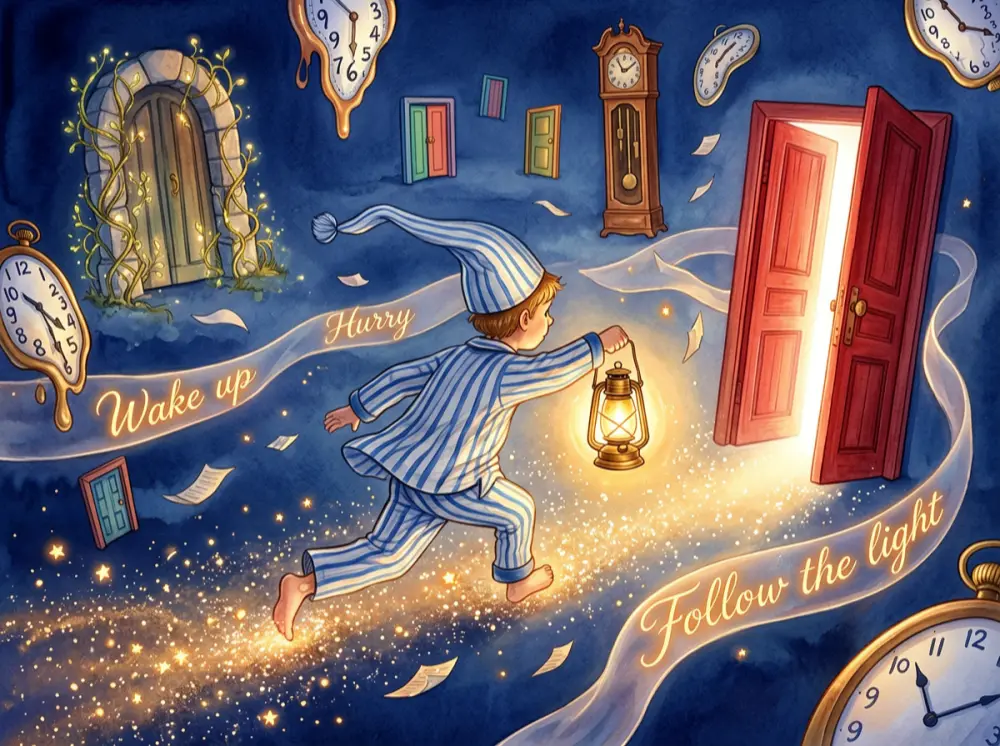
ERNIE Image sample output preview (not your generation)
Prompt

A horizontally composed fairy tale storybook illustration, employing a rear-side tracking perspective with a strong sense of speed and dynamism. The main subject is a young boy wearing loose blue-and-white striped pajamas, sprinting at full speed through a fantastical space. The boy's body leans dramatically forward, with his long, pointed nightcap and the edges of his clothing fluttering violently backward in the wind. His right hand tightly grips a vintage brass lantern that emits a bright glow. As he runs, a long trail of countless shimmering golden star dust and luminous particles streams behind the lantern and his body.The boy dashes through a floating labyrinth composed of dreamscape elements. Scattered throughout the frame and into its depths, various doors float at staggered heights: on the right side, a heavy mahogany door stands half-open with blinding white light piercing through the gap; in the upper left, an arched stone door entwined with glowing vines hovers in mid-air; further in the distance, several small colorful wooden doors of varying sizes can be seen. Clocks of various forms are scattered throughout the space—there are enormous pocket watches with surfaces warped and distorted as if melting, as well as antique grandfather clocks suspended in mid-air with scrambled dial numbers. Materialized "whispers" in the air take the form of glowing, semi-transparent ribbons and scraps of paper swirling around the boy. On the ribbons, glowing italicized English words are clearly visible: 'Wake up', 'Hurry', and 'Follow the light'.The dominant color palette of the scene consists of deep indigo blue and warm amber gold. The background is an unfathomably deep indigo-blue dreamscape void, while the lantern's glow, the starlight trail, the clock hands, and the glowing text ribbons all present a bright amber gold, creating a visually striking contrast between cool and warm tones. The overall painting style has a quintessential watercolor fairy tale illustration quality, with natural color transitions and soft, dreamlike lighting, fully conveying a whimsical, wondrous atmosphere along with a fast-paced sense of urgency.

Sample preview / ERNIE Image

Deep Dive

What Is Ernie Image Generator?

Understand what this AI image generator does and why it stands out in real-world design tasks.

ERNIE Image Generator is a text-to-image AI tool that converts prompts into detailed, structured visuals with strong text rendering and layout control. It uses a compact diffusion transformer model with a prompt enhancer to expand simple inputs into rich descriptions.

It’s built for tasks like posters, infographics, UI visuals, and multi-panel designs—where text clarity and structure matter.

Want a deeper look before generating? Our full ERNIE Image review covers benchmark scores and real test outputs. For output dimensions and model settings, see the configuration guide.

Diffusion Transformer (DiT, 8B)
Text rendering + structured layouts
Posters, UI, infographics
Competitive with larger models
Ernie Image Generator — hero illustration of structured layout generation with model capability card on dark canvas
Model Capability
Structured Layouts

Key Capabilities

Ernie Image AI for Structured Creation

Create posters, infographics, and UI visuals with clear text and structured layouts.

  • Generate structured images

    Clean layouts

    Ernie Image Generator builds structured visuals like posters and storyboards. It understands layout relationships between elements for balanced compositions.

  • Render text accurately

    Readable visuals

    Create images with clear, long-form text directly inside. The model handles typography better than most tools, ideal for marketing creatives and UI mockups.

  • Follow complex prompts

    Predictable results

    Input multi-object prompts with relationships. The system expands your prompt into a structured format for more consistent and controllable outputs.

  • Support multiple styles

    Flexible output

    Generate realistic photos, design graphics, or stylized visuals. Switch styles without rewriting prompts from scratch to speed up workflows.

  • Optimize generation speed

    Faster iterations

    Run image generation efficiently with optimized model size. Generate multiple variations quickly and refine outputs without long wait times.

  • Reliable Quality

    Pro-grade results

    Built on an 8B Diffusion Transformer, ensuring professional quality for every generated asset across various use cases.

Showcase

What you can build with Ernie Image

Real outputs from text-to-image workflows—structured layouts, legible type, and polished compositions you can ship or iterate on fast.

Ernie Image Generator — Coffee typography poster design

Coffee typography poster design

Creative coffee typography poster, words like coffee, espresso, latte, cappuccino arranged in the shape of a coffee cup, brown and orange color palette, clean vector design, modern typography, high contrast, branding poster style

Ernie Image Generator — Comic-style story panels

Comic-style story panels

Black and white comic strip with multiple panels, a mouse stealing a croissant from a kitchen, dynamic action, expressive characters, chef chasing the mouse, motion lines, dramatic angles, hand-drawn sketch style, high detail

Ernie Image Generator — Vintage Canvas Shoe Deconstruction Flat Lay

Vintage Canvas Shoe Deconstruction Flat Lay

A product teardown flat-lay photograph. On a light gray matte seamless surface, the individual cut pieces and components constituting a classic vintage canvas sneaker are neatly laid out flat. The image is shot from a top-down view using a knolling composition, with all parts maintaining even and precise spacing between them, spread horizontally to suit a wide-format frame.The upper portion of the image displays the sole components: a piece of off-white rubber outsole, clearly showing the wavy anti-slip tread pattern on its underside; beside it is a long white rubber foxing strip (binding tape) with an extremely fine black accent line along its edge, naturally presenting a gentle arcing curve.The central portion of the image features the main fabric cut pieces arranged in the middle: two pieces of gray coarse twill canvas upper panels, each displaying the streamlined contour of the left and right sides of the shoe upper, with pre-punched stitch holes clearly visible along the edges of the cut pieces; placed between the two upper panels is a semi-circular white matte rubber toe cap; immediately adjacent to the uppers, two slender gray canvas eyelet strips are laid flat, each inset with eight shiny silver metal eyelets.The lower portion of the image displays the accessories and internal structures: a slender gray canvas tongue; an off-white foam insole with an ergonomic arch support design, featuring black retro bold English lettering 'VINTAGE' printed at the heel area with 'FOOTWEAR' directly beneath it; two pure white cotton laces coiled extremely neatly into two symmetrical oval loops; scattered nearby are two small crescent-shaped canvas reinforcement pieces for the heel counter, as well as a square white fabric shoe label clearly printed with the black sans-serif text 'SIZE 42' and slightly smaller text '100% COTTON' below it.The lighting employs even, soft overhead diffused illumination, eliminating harsh shadows, so that the texture of every material — the rough fibers of the canvas, the slightly tacky surface of the rubber, the specular highlights of the metal — is rendered with utmost fidelity. The overall color tone is gentle, neutral with a cool bias, presenting a minimalist aesthetic combined with the rigorous craftsmanship of industrial shoemaking, with the image possessing extremely high clarity and sharpness.

Ernie Image Generator — Beach Bikini Girl Playful Selfie

Beach Bikini Girl Playful Selfie

A 4K high-resolution, hyper-realistic candid selfie photograph in landscape orientation. The main subject is a young woman with fair skin, the frame capturing her shoulders, collarbones, and part of her upper body. She has long, straight, light brown hair with a few strands blowing in the wind. She is positioned in the close foreground of a selfie perspective, her head slightly tilted, playfully sticking out her tongue, with her gaze directed to the side away from the camera. She is wearing a black thin-strapped bikini top with delicate lace trim along the edges. Around her neck, she wears layered gold necklaces featuring a gold cross pendant encrusted with tiny crystals, with a gold 'CD' logo charm incorporated into the chain. The subject is set in an open beach environment. In the background behind her, the blue-gray sea is rough with rolling white foam and surf. The sky is overcast, filled with white and gray clouds, though patches of bright light break through the cloud cover. In the far distance on the sea, the silhouette outlines of a pier or architectural structures are faintly discernible, along with scattered tiny figures of people in the water. The lighting is natural daylight with a slight backlit effect, casting soft shadows on the woman's face. The color palette combines cool oceanic blues, warm skin tones, and bright sky light, conveying a relaxed, playful summer beach vacation atmosphere. The lens focus is sharply concentrated on the woman's face, while the ocean and sky in the background exhibit a soft, shallow depth-of-field blur, emphasizing the main subject.

Ernie Image Generator — Logo Miniature Hyper-Realistic Photography

Logo Miniature Hyper-Realistic Photography

A vertical ultra-realistic miniature photography work. At the center of the frame is a massive 3D physical logo with the English text 'BRAND NAME' clearly and completely engraved on its surface. The logo retains its original shape and vivid colors. Around and on the surface of the logo, there are numerous realistic miniature human figurines at approximately 1:50 scale engaging in various interactions. Some figurines stand on scaffolding, painting the edges of the logo with brushes; some climb the logo structure using ladders and ropes; others wipe the surface clean with cloths, while some hold miniature cameras to take photos. The figurines are equipped with props such as ladders, ropes, and buckets. The background is a clean, pure white, non-gradient studio backdrop. The shot is captured from a macro photography perspective with shallow depth of field and a slight overhead angle to emphasize the massive sense of volume. The lighting consists of soft diffused white light from above and fill light from the side, casting realistic and delicate tiny shadows on the pure white ground and around the logo. The colors are true to life, and the text 'BRAND NAME' is crisp and sharp.

Ernie Image Generator — Nano Banana Icon Batch Generation

Nano Banana Icon Batch Generation

A carefully arranged collection of 40 minimalist food-themed icons on a clean white background, displayed in a neat grid layout. Each icon is rendered in a soft, rounded 3D style reminiscent of clay or matte plastic, featuring items like a croissant, sushi roll, hamburger, ice cream cone, pizza slice, donut, ramen bowl, and more. Each icon casts a subtle soft shadow. The overall palette uses warm, appetizing tones with gentle gradients.

Workflows

AI Image Generator for
Real Creative Workflows

Apply AI-generated images across marketing, design, and content creation.

  • Create marketing posters with AI

    Marketers generate promotional visuals with headlines, layouts, and branding elements. Output ready-to-use creatives faster without design tools.

  • Design infographics from text prompts

    Content creators turn structured ideas into visual infographics. AI handles layout, spacing, and labeling automatically.

  • Generate UI mockups for product ideas

    Product teams create UI-like images for early concepts. This speeds up idea validation without design resources.

  • Build storyboards for video planning

    Creators generate multi-panel images to plan scenes and sequences. This helps visualize ideas before production.

Step-by-Step Guide

How to Use Ernie Image

Turn a simple idea into a structured image in three clear steps.

  1. 1. Enter your vision

    Describe your image using natural language. Include subject, layout, text, and style for better results. The clearer your prompt, the more accurate the generated image.

  2. 2. Adjust settings

    Choose aspect ratio, style, and image quality. Fine-tuning these settings helps match your design needs, whether you're creating posters, UI visuals, or marketing assets.

  3. 3. Generate and download

    Generate your image in seconds and download it for immediate use. If needed, refine your prompt or settings to improve structure, text clarity, and visual consistency.

Trusted by Creators

ERNIE Image Powers Visual Teams Worldwide

4.9 / 5 Average Rating

  • ERNIE Image turns my simple text prompts into studio-quality visuals with perfectly rendered text—no Photoshop needed.

    Senior DesignerBranding Agency
  • We batch-generate product hero images in minutes. The 2048 px output is sharp enough for print, and the Turbo mode keeps costs low.

    E-commerce LeadDTC Brand
  • The Prompt Enhancer is like having a co-pilot for complex scenes. Structured layouts land exactly where I need them.

    Art DirectorCreative Studio
  • Switching between Turbo and Standard lets me prototype fast, then polish key assets—credits never feel wasted.

    Product ManagerTech Startup
  • In-image text rendering is finally accurate. Headlines, labels, and CTA copy come out crisp every time.

    Performance MarketerGrowth Agency
  • I've tried half a dozen AI image tools—ERNIE Image's Diffusion Transformer backbone delivers the best coherence on multi-object prompts.

    ML EngineerAI Lab

Want the numbers behind the praise? Our ERNIE Image review covers 200+ test runs with FID scores, speed benchmarks, and a full competitor comparison.

Simple Pricing

ERNIE Image AI Pricing — Simple Plans, No Surprises

Credits power ERNIE Image text-to-image: choose Turbo or Standard, set custom width and height (300–2048 px), and use optional Prompt Enhancer. Commercial usage is included—no surprise fees beyond credits.

Starter

$9.9

396 credits · $0.025/credit

Try ERNIE Image text-to-image with flexible sizes and Turbo or Standard speed.

  • ERNIE Image text-to-image
  • Custom width & height (300–2048 px)
  • Turbo (1 credit) or Standard (4 credits) per image
  • Optional Prompt Enhancer (PE)
  • Commercial usage rights
  • No watermarks
  • Standard processing

Pro

$29.9

1,300 credits · $0.023/credit

More credits for regular creators—same ERNIE Image features with better per-credit value.

  • Better per-credit value than Starter
  • Text-to-image, PE, and custom sizes (300–2048 px)
  • Turbo / Standard modes (1 / 4 credits per image)
  • Up to 4 images per generation
  • Commercial usage rights
  • No watermarks
  • Priority processing
Most Popular

Scale

$49.9

2,626 credits · $0.019/credit

High-volume image generation for teams that rely on ERNIE Image daily.

  • Strong per-credit savings vs. Starter
  • Full text-to-image workflow (sizes, PE, Turbo/Standard)
  • Up to 4 images per generation
  • Commercial usage rights
  • No watermarks
  • Faster processing

Prices include all taxes. One-time packs—credits never expire.

7-Day Refund
Stripe Checkout
24/7 Support
One-time purchaseCredits never expireCommercial useDirect support

Support

Frequently Asked Questions

Ernie Image Generator is used to create images from text prompts, especially for structured visuals like posters, infographics, and UI layouts. It focuses on accurate text rendering and layout consistency. This makes it useful for marketing, design, and content workflows.
It uses a diffusion transformer model combined with a prompt enhancer. The system expands simple prompts into detailed structured descriptions before generating images. This improves layout, relationships, and overall output quality.
Yes. It performs well on long-form and layout-sensitive text. You can generate readable text within images, making it suitable for posters, slides, and UI visuals where clarity matters.
Yes, depending on your plan and usage terms. Many users apply it to marketing creatives, product visuals, and content assets. Always check your usage scope before deploying at scale.
Ernie Image AI can generate posters, infographics, UI mockups, and storyboards. It supports both realistic and stylized outputs, including multi-object scenes and structured layouts. This flexibility makes it useful across design, marketing, and content creation.
Ernie Image AI is better for structured image generation and text-heavy visuals. It performs strongly in layout-sensitive tasks like posters and UI designs compared to general tools. The advantage depends on whether your workflow requires precision and layout control.

Start Creating Images with Ernie Image AI

Create high-quality images from text prompts with better structure, clearer text, and faster results.

How to Use · Read the Review · Pricing Plans